The key distinction: the indexed report describes Google's recorded information about the URL; Test Live URL checks selected conditions on the page now. A successful live test doesn't imply the URL is indexed. Use both views to decide whether to wait, fix a technical issue, investigate a canonical choice, or request another crawl.
What Is the Google URL Inspection Tool?
The purpose of the URL Inspection tool is to answer a particular question: What does Google's own reporting say about this URL, and what should I check next? It diagnoses individual pages, not entire websites.
You need access to the relevant Google Search Console property. The URL must fall within that property's scope. As an example, a URL-prefix property for https://www.example.com/ doesn't automatically cover https://example.com/ or a different protocol. Select the property that contains the URL you want to inspect.
The feature is available for URLs within properties you may access, not arbitrary pages on the web. Access to your property doesn't expose a linking publisher's private inspection report.
How to Inspect a URL in Google Search Console
To use the Google Search Console URL Inspection tool:
- Open Google Search Console and select a property you have permission to access.
- Enter the complete URL in the inspection field at the top of Search Console. Include the correct protocol, hostname, path, and any relevant URL variant.
- Read the indexed result first. Check the headline status and expand the page-indexing details to see what Google has recorded.
- Review discovery, crawl, and canonical information. Look for the last recorded crawl, whether crawling or indexing was allowed, and which canonical Google selected when that information is available.
- Select Test Live URL if you need a fresh accessibility check. Compare its result with the indexed record instead of treating the two as interchangeable.
- Select the next action based on the evidence. A technical error, a recent fix, and an intentional canonical alternative require distinct responses.
When available, open View Crawled Page to examine details from Google's recorded crawl, or View Tested Page after a live test. Compare the retrieved HTML and available page resources with the content you expect Google to see. Following a successful live test, a rendered screenshot may reveal content or resources that failed to appear. Don't assume a screenshot is available for every inspection.
Where inspection fails or the URL falls outside the selected property, verify your permissions, the full URL, and the property scope prior to investigating indexing.
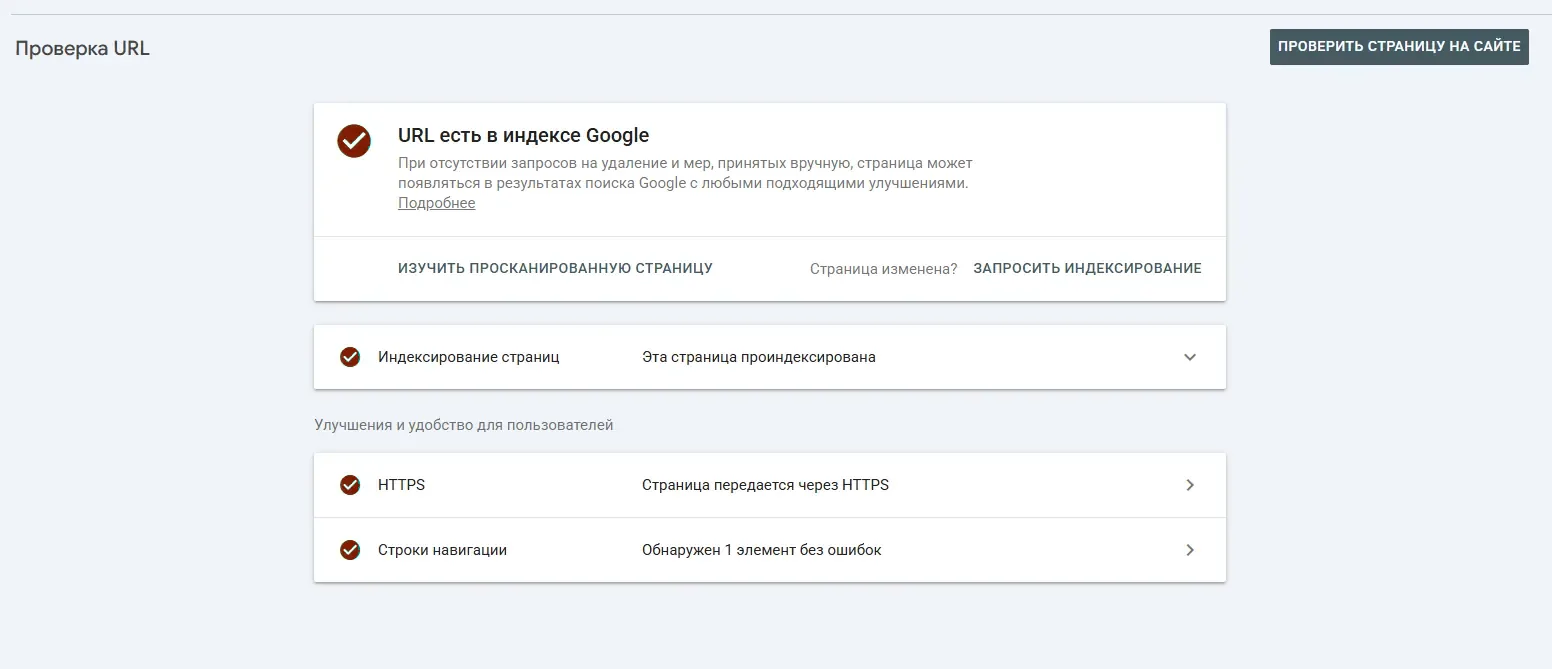
Indexed URL Report vs Test Live URL
This distinction explains many apparently contradictory inspection results.
| Question | Indexed URL Report | Test Live URL |
|---|---|---|
| What does it describe? | Google's recorded information about the inspected URL | A current test of selected access and indexing-related conditions |
| Does it display that a URL is indexed? | May report Google's recorded index status and selected canonical | No. A successful test isn't confirmation of inclusion in the index |
| Is it necessarily up to date with today's changes? | No. Google may have last crawled or processed an earlier version | It tests the current reachable version, subject to the test's limits |
| May it explain canonical handling? | May display user-declared and Google-selected canonical information when available | Doesn't determine which canonical Google will ultimately select for indexing |
| Does a favorable result guarantee indexing or search visibility? | No | No |
A successful live test doesn't assess every potential exclusion. It doesn't determine whether Google regards the URL as a duplicate, confirm discovery via sitemaps or referring pages, or rule out manual actions, quality or security issues, and temporary removals. A passing test may't exclude these causes of non-indexing. A live test may also follow a redirect without displaying the final tested URL; inspect redirects separately when the destination matters.
Example: you removed a noindex directive this morning. The indexed view may still describe an older crawl in which noindex was present. A live test may now display that Google may access the page and no longer encounters that directive. This means the current obstacle may be fixed; it doesn't imply Google has recrawled, reprocessed, or indexed the new version.
An older indexed status may also coexist with a new live access problem. Check the current server response prior to trusting the older record.
How to Read Indexing, Crawl and Canonical Details
Use supporting fields to understand the reported state and its recency.
| Field or signal | What it helps establish | What to check or do next |
|---|---|---|
| Page indexing status | Whether the inspected URL is recorded as indexed, excluded, or in another reported state | Read the particular reason and check whether Google selected another canonical |
| Last crawl | When Google's recorded crawl of the URL occurred, if available | Compare the date with your most recent change; don't assume yesterday's fix is reflected in an older record |
| Crawl allowed? | Whether the recorded crawl encountered a robots-related restriction | Review the applicable robots.txt rule and the current live result |
| Page fetch | Whether Google could fetch the page in the recorded inspection context | Investigate server errors, redirects, or other fetch problems if reported |
| Indexing allowed? | Whether Google encountered an indexing prohibition such as noindex |
Check the current directive and whether a new crawl is still needed |
| Sitemaps and referring pages | Discovery paths known to Google's reporting, when provided | Treat the entries as clues, not a complete inventory of every discovery source |
| User-declared canonical | The preferred URL signaled by the site, when Google may find it | Check that the preference matches redirects, internal links, and the intended page |
| Google-selected canonical | Which URL Google chose as representative in the indexed information, when available | Inspect the selected URL and decide whether the alternate is expected or unintended |
| Enhancements or structured data | Eligibility-related findings for applicable features | Investigate a reported issue only if that feature and its requirements apply to the page |
The Inspected URL Is Not Always the Indexed Canonical
Suppose you inspect https://example.com/services?ref=nav, but Google reports https://example.com/services as its selected canonical. The query-string version may not appear independently in the index since Google has chosen the cleaner URL as representative.
Where that choice is intentional, inspect the selected canonical instead of trying to index both variants. Where the choice is unexpected, compare content, internal links, redirects, and canonical signals prior to requesting another crawl.
A canonical tag is a signal, not a command. Live accessibility doesn't establish canonical selection; missing fields should remain unknown.
What Your Inspection Result Means and What to Do Next
Use the result to select an action without overstating the evidence.
| Inspection result | What it establishes | What it does not establish | Next action |
|---|---|---|---|
| URL is reported as indexed | Google has recorded inclusion for the reported URL or canonical context | That the page ranks for a query or that the content is currently unchanged | Check the selected canonical and last crawl if you recently updated the page |
| Not indexed, but the live test passes | The page currently passes the conditions checked by the live test | That Google has already indexed it or will index it automatically | Review the recorded reason, canonical selection, and last crawl; request a crawl only if appropriate |
| Live test reports an access or indexing problem | A current issue may prevent normal processing | That the historical index record has already changed | Fix the reported problem, test again, then allow time for Google to process the change |
| Google selected a distinct canonical | Google associates the inspected URL with a distinct representative URL | That both variants should be separately indexed | Decide whether the selection is intended; investigate conflicting signals if not |
| The last recorded crawl predates a fix | The indexed view may reflect an older page state | That the fix failed | Confirm the fix with a live test, then consider Request Indexing for an eligible URL |
| You may't inspect the URL in this property | The URL or your access doesn't match the selected property | Anything about the URL's index status | Select or verify the correct property; use another permitted method for an unowned URL |
Three cases merit a closer look:
- Live test passes, indexed report is still negative: Compare last crawl with the fix date. Where Google has revisited the page, investigate the recorded exclusion instead of repeating requests.
- Google chose another canonical: Where the variants are equivalent, that may be expected. Otherwise compare redirects, internal links, content, and canonical signals.
- Indexed but not ranking for a query: Inspection reports indexing information, not a diagnosis of every ranking or serving issue.
For deeper causes after identifying a particular exclusion, use the guide to why a page is not indexed by Google. Keep the URL Inspection evidence at hand so the next diagnosis starts with an observed condition, not a guess.
Request Indexing and Other Limits
For an eligible URL in a property where you have the necessary permissions, Search Console may offer Request Indexing. It's helpful after a meaningful correction or when asking Google to reconsider a new or changed page. A request asks Google to crawl the URL; it doesn't provide a guaranteed crawl time, indexing decision, or ranking outcome.
Prior to requesting another crawl, check whether the page is accessible, lets indexing, and points to the intended canonical. Repeated requests for an unchanged URL don't force faster processing. For the complete one-page submission procedure, see how to submit a URL to Google.
Other limits:
- Visible crawl information isn't a guarantee of inclusion. A server-log Googlebot visit, even when the crawler is properly verified, is evidence of a request instead of an index verdict.
- Report details vary. Some fields and enhancement sections are unavailable or irrelevant for certain URLs. Their absence isn't automatically an error.
See Google's URL Inspection documentation for current interface labels and permissions.
When to Use Another Report or Tool
Other questions need distinct tools.
| Your question | Better next step |
|---|---|
| Are multiple pages across my site affected by the same issue? | Use the Google Page Indexing Report to find site-wide patterns |
| Why is this particular eligible page still missing? | Follow a focused not-indexed diagnosis after reading its inspection result |
| Do I have to check index-presence signals for URLs outside my verified Search Console properties? | Consider a separate Google Index Checker, with its own methods and limits |
| Do I have to request another crawl of one of my pages? | Use the dedicated single-URL submission guide |
Nuclear Link Indexer's standalone Index Check is a separately paid service and is not Google's Search Console URL Inspection report. Its search-result-based check may miss indexed URLs, so a negative result should not override official inspection data available for your verified property. Google's Search Console URL Inspection API returns indexed inspection data for URLs in authorized properties; it doesn't run a live test. The standalone Google Indexing API is limited to eligible job-posting and livestream pages, not general-purpose URL submission.
For a page you own, start with the exact URL, read the indexed record, use a live test when the current condition matters, and interpret Google's canonical choice prior to deciding what to do next.