How to Check a URL in Google's Index
- Enter the exact URL. Include the page path you want to assess, not just the domain. Keep
httpandhttpsvariations, redirects, and alternate paths in mind when interpreting the response. - Run a standalone check. Submit the URL via Google Index Check. You don't have to order an indexing-delivery project first. The check moves via the queue as it's processed.
- Review the finished result. Read the status, check timestamp, and matched URL, if one is returned. Where the request ends in an error, review its details and retry instead of treating it as an indexing verdict.
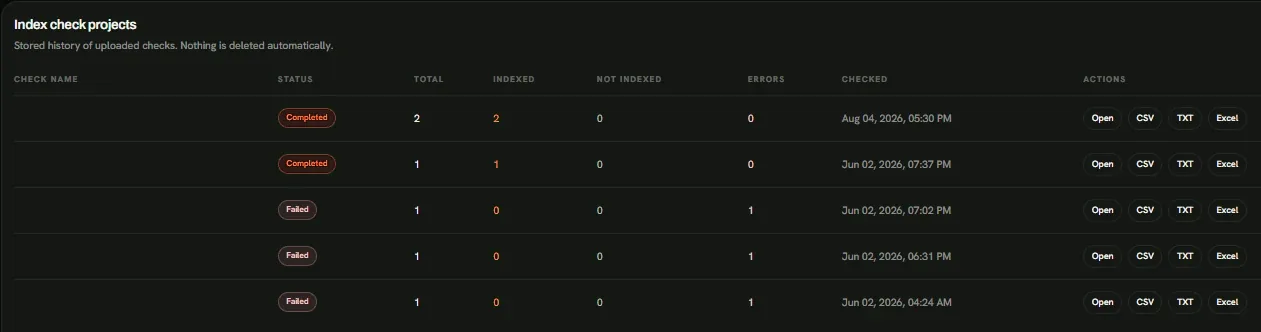
How to Read Your Google Index Status
The status displays what happened during a particular check. Distinguish a completed search-result check from a request that has not finished or did not return usable evidence.
| Result | What It Means | What to Do Next |
|---|---|---|
| Queued | The URL is waiting to be processed. | Allow the queued check to finish; no index-status result is available yet. |
| Running | The check is in progress. | Wait for the completed result prior to interpreting it. |
| Indexed | The method found a positive Google search-result signal. | Compare the submitted URL with any matched URL. Use Search Console for deeper diagnosis when you control the property. |
| Not Indexed | The check did not find the expected search-result signal. | Check the URL and available matches, then investigate further instead of assuming Google has excluded the page. |
| Error | The check did not produce a usable status. | Read the error information and retry the request. |
Nuclear Link Indexer's current method uses a Google site:-style query. As Google Search Central explains, site: results are not exhaustive. A URL may be indexed without appearing in a particular site: query. Even an Indexed result is evidence from this method, not a complete Google URL Inspection record for the exact submitted address.
Example: Submitted URL and Matched URL. Suppose you check https://publisher.example/article/, and the result returns Indexed with a matched URL of https://publisher.example/story/. That is a helpful search signal, but it isn't enough to assume the original /article/ address is Google's indexed version. Inspect redirects and the page's canonical signals, then compare the relevant URLs. If a check instead returns Not Indexed, the missing match is a reason to investigate — not proof that the page is absent from Google's index.
A page may also be technically accessible and apparently indexable without being indexed. Likewise, a positive index-status signal doesn't promise rankings, traffic, or that Google has credited a particular backlink.
Bulk Google Index Checking
For multiple pages, Nuclear Link Indexer's bulk Google index checker accepts pasted lists and TXT, CSV, or XLSX imports. A campaign organizes the checks so you may review each URL instead of relying on one overall verdict.
- Create a named Index Check campaign and submit the URL list.
- Follow the campaign and individual URL states. Completed checks, pending work, and errors may appear in the same campaign.
- Review the results, retry failed checks where available, and export the report in CSV, TXT, or XLSX format.
Report records may include the submitted URL, status, matched URL, check time, and error details where applicable. After a publisher corrects a redirect or you resolve a page issue, run a new Index Check and compare its timestamp, submitted URL, and any matched URL with the earlier result. Distinct observations don't establish when Google indexed or removed the page.
Index Check is a paid operation that uses TOK from your Nuclear Link Indexer package balance. Confirm the applicable rate prior to launching a campaign. Where you want to submit many URLs for indexing delivery instead of check their search-status signals, use the standalone Bulk URL Indexer.
Checking Website Pages and Backlink Source URLs
Use the site indexing checker to assess the search-result signal for a particular article, product, or landing page on your site. A positive signal for your homepage doesn't establish the index status of other URLs on the same domain.
For a backlink source page, suppose https://publisher.example/article/ contains a link to https://example.com/services/. Submit the publisher's article URL to assess the index-status signal of the page carrying the backlink — not your services-page URL. This check doesn't establish whether the backlink is still present, points to the correct destination, or is counted by Google.
To verify the link's presence, destination, or attributes, see Backlink Checker. For the broader distinction between the source page and the link it contains, see Backlink Indexing.
Google Search Console vs. Third-Party Index Checks
For a property you own or may access, Google Search Console URL Inspection provides Google's first-party information about the inspected URL, such as available indexing and canonicalization details. See Google's URL Inspection documentation for the relevant diagnostics.
Nuclear Link Indexer serves a complementary need: checking the search-result signals for individual URLs or lists without requiring an indexing-delivery order. It doesn't return an official Search Console verdict. Its method and Search Console may disagree since they answer the question using distinct evidence.
For a publisher's page on someone else's domain, you generally may't use URL Inspection in your own Search Console account unless you have verified access to that property. A search-based check may still help you to decide what to inspect next.
What to Do When a URL Is Not Indexed or Cannot Be Confirmed
Your next move depends on who controls the URL and what evidence you have — not just whether a status says Indexed or Not Indexed.
- For your own URL: If a check fails, retry it. Where it completes with no positive signal, compare URL variants, redirects, and canonical hints, then inspect the page in Search Console. If you find accessibility,
robots.txt,noindex, or canonical problems, resolve those prior to considering another delivery attempt. - For another publisher's URL: Confirm that the page loads and that the expected backlink still exists. Where the page is inaccessible, the link has changed, or a technical problem needs correcting, contact the publisher. You may't repair another site's page by running an index check.
A positive search signal is worth recording with its timestamp, but it doesn't establish the backlink's SEO value. Where the page is technically ready and your goal is URL submission for indexing delivery, explore Nuclear Link Indexer's URL indexing workflow or project-based indexing service. Delivery, any recorded Googlebot visit, and a standalone Google Index Check are distinct outcomes; Google makes the indexing decision.