Don't start by trying to make every gray, not-indexed URL turn green. First ask whether those URLs should appear in search. Redirects, duplicates, intentionally excluded pages, and retired content may be absent for good reasons. Your priority is significant, intended-to-be-indexed pages that are unexpectedly missing, especially when a change affects an entire section.
Use the report to find a group worth investigating, then inspect individual examples prior to deciding what to fix.
How to Find the Page Indexing Report
- Open Google Search Console and select the property that covers the site or section you want to review.
- In the navigation, open Indexing > Pages.
- Look at the Indexed and Not indexed totals and the chart showing their history.
- Open a row in Why pages aren't indexed to see its reason, trend, and example URLs. You can also use View data about indexed pages to inspect examples of indexed URLs.
Check the property's scope prior to comparing numbers. A URL-prefix property covers its configured prefix; a Domain property covers more. Sitemap filters also change which URLs are included.
The report aggregates URLs Google knows about within that scope; it isn't a live test of every page. Google's official Page indexing report guide is the reference for its controls and reason descriptions.
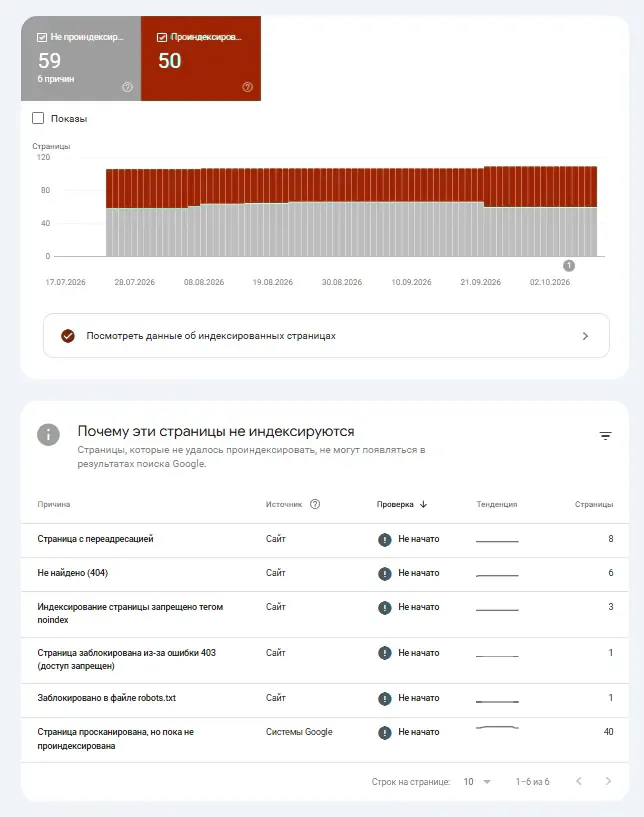
What Indexed and Not Indexed Actually Mean
The two headline groupings describe Google's recorded indexing outcome, not a universal score for your site's health.
| Report grouping | How to interpret it |
|---|---|
| Indexed | Google reports that the URL has been included in its index. This doesn't promise visibility or ranking for a particular search. |
| Not indexed | Google knows about the URL but has not indexed it. The reason may indicate a problem, an expected exclusion, or a decision that needs more evidence. |
A reason label adds context, but it isn't always a root-cause diagnosis. For example:
- Discovered — currently not indexed means Google knows the URL but has not crawled it yet.
- Crawled — currently not indexed means Google crawled it but has not indexed it. Repeatedly submitting that URL isn't a substitute for investigating whether it merits inclusion.
- Page with redirect, URL marked 'noindex', and duplicate or alternate-page reasons may be perfectly appropriate when those URLs are not intended to be indexed individually.
The goal is to get intended canonical versions indexed, not every URL Google has found.
Older tutorials may use the former Coverage headings Valid, Warning, Error, and Excluded. These are not interchangeable with today's Page Indexing summary and reason groups.
Which Excluded URLs Need Attention?
Start with the role of the URL, then combine the report reason with the size and timing of the affected group. The following priorities are practical review decisions, not severity labels assigned by Google.
| Pattern you see | Question to ask | Priority | Best next action |
|---|---|---|---|
| Significant product, category, or article URLs unexpectedly appear under Not indexed | Should these exact canonical URLs be searchable? | High | Inspect representative URLs and compare the report's reason with their current state. |
| A reason group jumps across a key directory after a release | Did a template, deployment, access rule, or canonical setup change? | High | Compare the chart with the release date and investigate examples from the affected section. |
Intentionally redirected or noindex URLs |
Is exclusion part of the publishing plan? | Usually low | Record the behavior as expected. Review only when the redirect or exclusion was unintentional. |
| Duplicate or alternate URLs | Is Google indexing the intended canonical version instead? | Usually low | Check the user-declared and Google-selected canonical for representative URLs if the choice seems wrong. |
| Old URLs returning 404 after deliberate removal | Should these pages still exist or have replacements? | Usually low | Confirm the removal is intentional and that significant internal links or sitemaps don't still point to obsolete URLs. |
| Counts or example URLs don't match your inventory | Are you comparing the same property, sitemap filter, and URL population? | Investigate first | Check scope and samples prior to calling the difference an indexing failure. |
Don't prioritize by the largest count alone. A thousand intentionally canonicalized filter URLs may be less concerning than a handful of newly published, revenue-critical pages that Google has not indexed.
Check the Source column, too. It indicates whether an issue relates to the site or Google's processing, but you still need URL-level evidence. Validation may't force Google to index a crawled page or select your preferred canonical.
How to Read Reason Groups, Examples, and Trends
Clicking a reason opens its detail view, such as a count over time and example URLs. Read these as group-level evidence, not a complete export of every affected URL.
Google limits an example list to 1,000 URLs, and the list isn't guaranteed to contain all affected URLs even when the group has fewer than 1,000. A missing URL in that example list doesn't demonstrate that Google indexed it or that the reason no longer applies.
The scope of the numbers also matters:
- All known pages includes URLs Google knows about, not every address in your CMS or database.
- All submitted pages and a specific sitemap filter allow you to focus on URLs associated with submitted sitemaps.
- A chart's reported totals may differ from a manual inventory or export since the sets and reporting times are not identical.
Where your CMS contains more significant, intended canonical pages than Google reports as known, investigate discovery instead of treating those missing URLs as indexing exclusions. Check whether the pages are reachable via internal links and included in the appropriate sitemap.
Use the trend to form a question, not jump to a conclusion. As an example, if a group of significant pages grows after a template release, look for a shared change across a sample of those pages. Where duplicate URLs rise after adding new filters to a store, first verify whether Google's selected canonicals are the intended products or categories. Neither pattern alone proves a site-wide indexing defect.
Follow the date of the report and the date of the underlying page change. Search Console updates and Google recrawls are not instantaneous. A reason may persist in the report once you have fixed the current page since the recorded crawl predates the change. Inspect the particular URL prior to reopening an already resolved engineering task.
A Five-Step Report Review Workflow
Use the same routine each time you review the Page Indexing report. It makes the next action easier to explain to a developer, editor, or client.
- Choose a meaningful group. Start with an unexpected increase or a reason affecting significant canonical pages. Record the selected property, filter, reason, and report date so you may compare the same view later.
- Find what those URLs are meant to do. Standalone pages intended for search from redirects, parameter variants, old content, deliberate
noindexpages, and alternate canonicals. A not-indexed status is only actionable in the context of that intent. - Look for a shared pattern. Check whether examples come from one template, directory, publishing batch, or recent deployment. Compare the trend with your release history instead of assuming every URL needs an individual fix.
- Inspect representative URLs. Open an example in Google's URL Inspection tool to investigate its recorded status, last crawl, and canonical selection. Compare those details with the page as it currently exists. Don't treat the group label as proof that all examples have the same technical cause.
- Assign an action and record evidence. Mark the group as expected, investigate, or fix, find the responsible team, and set a reason to review it again. Where you corrected a site-controlled issue across the affected URLs and Search Console offers Validate fix, use it for that issue and monitor the validation outcome.
Before starting Validate fix, check the active sitemap filter. Where the report is filtered to a particular sitemap, validation covers URLs in that sitemap at the time of the request, not the entire property. Confirm that the relevant issue instances have been corrected. Google may also recognize fixes during later crawls without a manual request. Validation tracks verification; it doesn't force indexing.
As one case, if significant category pages appear as excluded after a site release, inspect a few across the template prior to requesting widespread changes. If the noindex directive is unintentionally present, correct the shared template, check the affected pages, and then use the appropriate validation workflow. Where the pages are intentionally consolidated under another canonical, document that instead of creating unnecessary remediation work.
What the Report Cannot Tell You
The Page Indexing report is valuable since it comes from Google for your verified property, but it has clear boundaries.
It doesn't provide a real-time, exhaustive inventory of all URLs on your site. The reason groups are based on Google's known URLs and recorded processing, while the example lists are limited samples. A page absent from the report may not have been discovered yet, or may fall outside your chosen property or filter.
It doesn't demonstrate the cause of every individual URL's outcome. A reason may point you toward a problem, but an individual URL Inspection gives more particular Google-side evidence. For a page that remains missing unexpectedly, use a focused not-indexed page troubleshooting guide instead of guessing from the group's name.
It doesn't promise search placement. Indexed means eligible to appear in Google's search results, not that a page will rank for a chosen query. A request to recrawl a page, a fix validation, and an indexing outcome are standalone events.
An independent Google Index Checker may serve a distinct known-URL checking task, but it isn't a replacement for the verified-property report in Search Console. Likewise, observing Googlebot activity doesn't, by itself, confirm index inclusion.
What to Do After You Prioritize
Turn the review into a short working list: affected group, intended URL type, number and trend, representative evidence, owner, next action, and review date. Keep intentionally excluded URLs separate from unexpected losses, so a healthy canonical or redirect policy doesn't inflate the issue backlog.
Investigate urgent groups first, particularly those affecting significant pages or many URLs sharing a changed template. Where a particular page still requires diagnosis, continue with the URL Inspection workflow or reasons a page may not be indexed. For questions about overall discovery and crawling, see how Google indexing works.
Your goal is to find missing pages that matter, gather helpful evidence, and avoid fixing exclusions that work as intended.