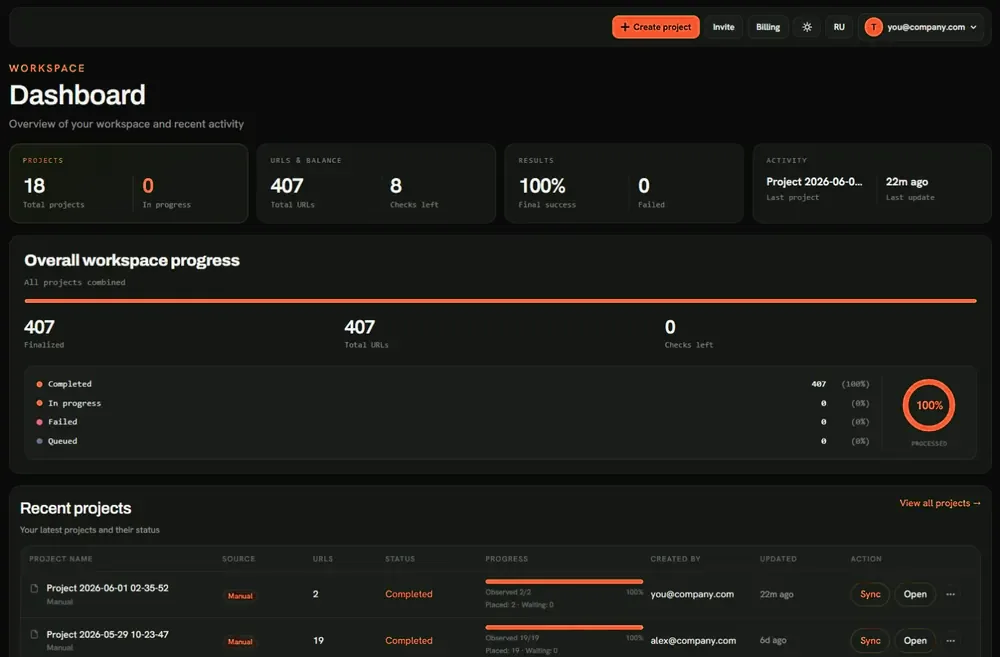
What Nuclear Link Indexer Does for Your Links
The essential input is the URL of the page you want Google to encounter.
For backlink indexing, that normally means the source page - the publisher article, directory listing, resource page, or other accessible document containing the link. Suppose a placement appears on https://publisher.example.com/resources/guide and points to https://yourbrand.example.com/service. The page to submit for backlink indexing is the publisher's resource URL, not your service URL.
For your site, submit the relevant landing page or article instead.
| Your situation | URL to work with | What to confirm first |
|---|---|---|
| A publisher has placed your backlink | The publisher page containing that backlink | The page is accessible and the expected link is present |
| You have published a new page on your site | Your own page URL | The page resolves correctly and is intended to be indexed |
| You have a list of placements from multiple publishers | Each individual source-page URL | The list contains actual pages, not just publisher homepages or target domains |
Nuclear Link Indexer's backlink indexing service keeps source-page URLs and their processing records organized in projects. The optional technical pre-check may flag certain blockers prior to delivery, while reports distinguish processing from observed crawler activity. For more on publisher-page submissions, see how backlink indexing works.
From Submission to Evidence You Can Read
A backlink indexing tool should answer: What happened to my URL, and what evidence came back? Nuclear Link Indexer separates the steps instead of suggesting that submission means indexing.
The Indexing Workflow
- Create a URL project. Add a page or list of pages to your workspace. For larger workloads, supported file imports include CSV, TXT, and XLSX.
- Select a readiness approach. Use the optional technical pre-check to find certain access, robots,
noindex, response, or canonical issues prior to delivery, or proceed with the supplied URLs without that filter. Bypassing the filter doesn't make a blocked URL indexable. - Submit for delivery. The selected URLs enter Nuclear Link Indexer's processing workflow. The service supports distinct processing priorities; the higher-priority option affects the service queue, not Google's timetable.
- Review the evidence. Inspect the project outcome and any stored Googlebot observation. Where you need an index-status signal, start a standalone check instead of treating delivery as proof of inclusion in Google.
Project reports allow you to review the submitted URL and processing status alongside a Googlebot detected indicator. Where an observation exists, its timestamp in UTC and available IP or user-agent details provide particular crawl evidence that may be retained or exported. Combined with technical warnings, these records help you to decide which URLs need a fix, which have no recorded visit, and which may warrant a standalone index-presence check.
As an example, an agency managing 30 publisher URLs could export the per-URL records and group them by next action: investigate flagged technical issues, review processed records without observed Googlebot activity, and run standalone index checks where an index-presence signal is needed. The report documents processing and any observed visit; neither is proof of Google indexing.
Check Whether a URL Is Ready
Resubmitting an inaccessible or blocked page won't fix it. Review the URL prior to spending a delivery budget.
Use this quick decision guide:
| Check | Why it matters | Sensible next move |
|---|---|---|
| Does the page load at the expected URL? | Errors, timeouts, or unexpected redirects may prevent access to the intended content | Resolve the page or destination issue prior to delivery |
| Is indexing restricted? | Robots rules, meta noindex, or an X-Robots-Tag may prevent normal indexing |
Review the restriction with the site owner; don't assume it's safe to remove |
| Does the canonical point elsewhere? | Google may select a distinct canonical URL | Confirm which page should be treated as the preferred version |
| Is the backlink still present? | Submitting a publisher page may't restore a removed or incorrect link | Check the live placement and contact the publisher if needed |
Nuclear Link Indexer's optional technical pre-check may flag common URL-readiness problems, such as HTTP errors, access restrictions, noindex signals, and canonical issues. Depending on the result, problematic URLs may remain visible in a project while being excluded from the current delivery run.
The pre-check is neither a full SEO audit nor a backlink-presence or Google index-status check. Verify third-party placements separately.
Where you don't control a publisher's site, report the issue to its owner. Investigate recurring URL errors prior to paying for another attempt.
Choose the Right Indexing Workflow
Select your indexing workflow based on the task: submitting a single URL, processing a larger batch, or checking an existing Google index signal.
| Your task | Best next step | What you gain |
|---|---|---|
| Submit an individual page or a small set of site URLs | URL Indexer | A focused route for ordinary URL indexing delivery |
| Prepare and submit many pages or backlink-source URLs | Bulk URL Indexer | File import, project organization, and per-URL reporting workflows |
| Check a URL's current Google index signal | Google Index Checker | A standalone check instead of another delivery request |
For a backlog of link placements, keep the source-page URLs distinct from the destination URLs on your own site. This prevents a frequent mistake: bulk-submitting your landing pages when the actual objective is to bring the publishers' pages to Google's attention.
Nuclear Link Indexer may import lists and divide larger sets into projects or orders. Keep campaigns standalone in your records, and check current upload limits in the workspace.
Where you only want to know whether a particular URL currently returns an index-presence signal, don't order indexing delivery just to answer that question. Start with the checker. Conversely, a check doesn't submit the page for processing. These are distinct services and may be used independently.
Understand Indexing Status and Its Limits
Standalone service actions from Google's activity. Match every claim to the evidence.
| Signal | What it supports | What it does not establish |
|---|---|---|
| URL added to a project | The URL was provided for a defined workflow | That a crawl happened |
| Technical pre-check passed or raised a warning | Certain technical access and indexing signals were assessed | That Google will accept or index the page |
| Delivery/processing status | The URL's position or outcome in the Nuclear Link Indexer workflow | That Google has indexed it |
Googlebot detected with an observation time |
A crawler event was recorded for that URL | Google index inclusion, rankings, or backlink value |
| Positive result from a standalone Google Index Check | The current check returned an index-presence signal | A guaranteed, permanent or exhaustive index status |
| No match or an error from that standalone check | The chosen method did not return a positive match, or the check did not complete | Definitive proof of exclusion from Google's index |
The standalone Google Index Checker uses a search-result-based site: approach. Such results are not exhaustive, so a negative result should not automatically be treated as Google's final verdict. For a site you control, Google Search Console's URL Inspection offers a more authoritative way to investigate your own property.
For an example of what not to do, consider a publisher page marked processed, with a recorded Googlebot visit, but no positive index signal from a later check. The supported summary is: the service processed the URL, a crawl event was observed, and the standalone check did not return a positive signal. It isn't accurate to report either “indexed successfully” or “definitely never indexed.”
Keeping those statements standalone helps teams decide whether to inspect the source, recheck later, or take no action.
Built for Different SEO Workflows
Link builders managing third-party placements. Submit the actual publisher URLs, not a collection of referring-domain homepages. Keep a record of placements that are live but technically problematic, and use observed results to decide which publisher follow-ups are worth making.
Agencies working across clients. Organize campaign URLs into projects and use status/report exports to distinguish an action completed by your team from an event observed later. A report that says “Googlebot detected: No” should not become a client-facing promise that the page was crawled.
Publishers and site owners. Review technical readiness on pages you control, fix visible restrictions where appropriate, then use the URL delivery workflow for pages that make sense to submit. Where your objective is to check whether a page appears in Google's index, use the independent checker instead.
The shared discipline is simple: submit the right URL, standalone source-page problems from processing, and report only supported outcomes.
Get Started: Access, Priorities, and Costs
For backlinks, copy the publisher page URL; for your own content, copy the page URL. Sign in or create an account to access your Nuclear Link Indexer workspace and start an indexing project.
Prior to confirming a project, review these decisions:
- Which URLs are going in? Remove obvious duplicates and make sure you have source-page URLs when your goal is backlink indexing.
- Will you use the technical pre-check? It may help find common problems prior to delivery. Decide what to fix or exclude instead of assuming all submitted pages are suitable.
- Which delivery priority do you need? A higher-priority option affects handling in Nuclear Link Indexer's delivery queue. It may't promise an earlier Googlebot visit or faster indexing by Google.
- What does the delivery quote cover? The workspace TOK quote concerns your selected indexing-delivery workflow and processing options, not a guaranteed Google-indexed result. Review the quoted cost, your URL count, chosen priority, applicable limits, and current package terms prior to confirming. Don't assume excluded, duplicate, or unsuccessful URLs automatically qualify for free processing or refunds.
- Do you also need an index check? Standalone Google Index Check is its own token-charged operation. Consider that cost independently instead of assuming it's bundled with delivery or that the check guarantees Google index inclusion.
Have your source-page URLs ready? Sign in to Nuclear Link Indexer, create an indexing project, select whether to run the technical pre-check, and review your delivery priority and current token quote prior to confirming.
Google Index Check is available as a standalone workflow when your goal is to investigate an index-presence signal instead of submit another delivery request.